


PetSmart
3.810.25K Reviews
App Specs
- Version
- 15.9.0
- Updated On
- License
- Free
- Downloads
- 5,000,000+
- Developer
- PetSmart LLC
- Categories
- Shopping
- Platform
- Android, iOS
Screenshots


 Analysis by AppCompare
When I decide whether a pet shopping app deserves a place on my phone, I look beyond the product catalog. I want to know whether it helps with the errands I actually have: replacing a familiar food, planning a grooming visit, or keeping track of the small purchases that are easy to forget. PetSmart is most useful when those tasks already fit into your routine, because it brings shopping and pet-related services together under one roof.
That convenience has a trade-off. A retailer’s app is naturally most helpful when you are comfortable using that retailer; it is less compelling if your main goal is to compare the entire market or manage every part of pet care in one independent place. I would judge it by how often its shopping and service options match your needs, not by expecting it to replace professional veterinary advice or every other pet resource.
Choosing by the errands you need to handle
Before downloading, I’d ask myself a practical question: do I want a quicker way to shop with PetSmart, or am I looking for a broader tool for pet ownership? The app is a free shopping app from PetSmart LLC, and it has been available since November 18, 2016. Its current version is 15.3.1, with an age rating of Everyone. Those basics make it easy to try, but the real decision is whether its store-focused approach fits your habits.
The app has an average rating of 3.7 from around 28,000 ratings, alongside roughly 10,000 written reviews and over 5 million installs. I see that as a reason to approach it with realistic expectations rather than assume every feature will suit every household. A useful test is to start with one task you already need to do—such as finding a familiar item or checking a service—and see whether the app makes that task simpler than your current routine.
Where a retailer app can save effort
For a household that already shops at PetSmart, bringing product browsing and service-related tasks into the same app can reduce the back-and-forth between separate tools. One non-obvious way to make that useful is to treat the app as a planning aid rather than a place to browse aimlessly: check what you need before you run low, make a short list, and handle the shopping part when it suits your schedule. That helps avoid last-minute decisions, especially for recurring supplies.
For example, imagine noticing in the evening that your dog’s food is nearly gone while also realizing a grooming visit needs arranging. Instead of trying to remember both tasks the next morning, you can use the app as a starting point for the shopping and service steps. I would still check the details of any service before relying on a booking, but having the relevant tasks gathered in one retailer’s app can make the planning less scattered.
This approach is especially helpful if more than one person in the home shares pet errands. A simple routine—one person checks supplies, the other handles the service appointment—can make it clearer what has already been taken care of. The app does not remove the need to coordinate, but a shared habit of checking the same place can reduce missed or duplicated errands.
Worth Reading Before You Choose

EA SPORTS FC Mobile 26 Is a Bigger Football Game, but It Takes Time

Flipboard Shows What News Apps Must Do Beyond the Feed

Switching to Android Auto Means Rethinking Your Driving Routine

Google Calendar Makes a Crowded Week Easier to Manage

Ludo King Makes the Most of the Minutes Between Plans

Baby Panda World Brings Quick Play to Modern Phones, but Its Game Library Feels Busy
Meet PetSmart: Your Pet's New BFF
First things first, PetSmart is not just about shopping for pet supplies. Sure, it has a fantastic collection of pet products, but this app is also packed with features that cater to every aspect of pet care. It’s like having a pet store, vet, and pet community all bundled into one neat package.
Features that Stand Out
Let’s dive into what makes this app a must-have for pet lovers.
- Shopping Made Easy: The app offers a vast range of products, from food to grooming tools. You can filter through categories, compare prices, and read reviews, making your shopping experience smooth and satisfying.
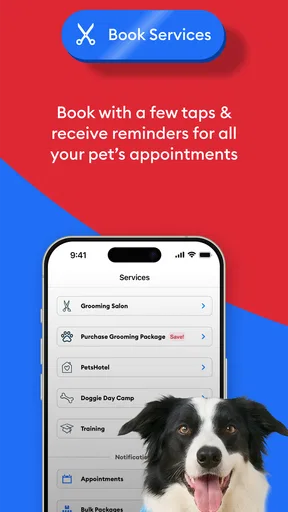
- Pet Services: Need a grooming session or a vet appointment? The app allows you to book services directly, saving you the hassle of phone calls and scheduling conflicts. Plus, it sends reminders so you never miss an appointment.
- Community Connection: There’s a thriving community feature where pet parents can share tips, ask questions, and even arrange playdates for their pets. It’s a great way to connect with fellow pet enthusiasts.
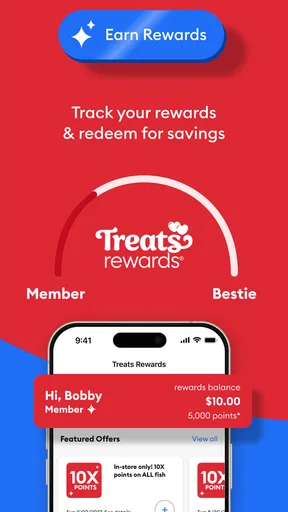
- Loyalty Rewards: As you shop and use services, you earn points that can be redeemed for discounts. Who doesn’t love a little extra savings?
These features are thoughtfully designed, making the app not just functional but also fun to use. It feels like PetSmart truly understands what we need as pet owners.
Using the App: A Seamless Experience
Downloading and setting up the app was a breeze. The user interface is intuitive, with bright, friendly colors and easy-to-navigate menus. Whether you’re tech-savvy or not, you’ll find your way around in no time. I particularly liked how the app personalizes the experience based on your pet’s profile, suggesting products and services tailored to specific needs.
What’s more, the app’s performance is slick. No lagging or crashing, just smooth sailing, which is crucial when you’re juggling a busy life with a busy pet.
The Community Vibe
One of my favorite aspects of PetSmart is the community section. It’s like a social media platform just for pet lovers. You can share cute pet pics, swap stories, and even get advice from seasoned pet owners. This feature not only enhances the app’s utility but also brings a sense of belonging among users. It’s not just about using a service; it’s about being part of a community.
Finding the right alternative
If your priority is the widest possible comparison across retailers, a general shopping marketplace may be a better first stop. Those options can make it easier to compare offers from different sellers, while a retailer’s own app is more directly useful for browsing that retailer’s products and services. I would not assume one approach is always cheaper or faster; the better choice depends on whether convenience with a familiar store matters more to you than comparing a wider range of sellers.
For health questions, a veterinary clinic’s own communication tools and a direct conversation with a veterinarian are more appropriate than a shopping app or community discussion. Other pet-focused services may also suit someone whose main need is finding local care rather than buying supplies. I see the community element as a place for exchanging everyday experiences, not as a substitute for professional advice when an animal seems unwell.
Small habits that make it more useful
One practical tip is to use a pet profile, if it is part of your setup, as a reminder of the details you need while browsing. Keeping the animal’s needs in mind can make product suggestions more relevant, but I would still check labels and suitability myself rather than treating recommendations as a guarantee. Food, grooming products, and other supplies are personal choices, and a familiar brand or item may matter more than a suggested alternative.
Another useful habit is to separate urgent needs from browsing. If you need a staple item soon, search for that first and confirm the product details before spending time exploring other categories. For non-urgent purchases, browsing can help you discover options, but it can also encourage unnecessary add-ons. I find a short shopping list keeps a retailer app focused on the errand rather than turning it into open-ended scrolling.
Service scheduling deserves a similar check. Before planning around an appointment, review the available details and make sure the service suits your pet and your timing. Digital booking can reduce the effort of arranging a visit, but it does not remove the value of confirming anything important directly with the provider, particularly if your pet has special needs.
What to expect before switching your routine
Moving from a browser, a store visit, or another shopping app does not require changing everything at once. I would begin with one familiar purchase and see whether the app makes it easier to locate and manage. If it does, I’d gradually use it for other errands. If you already have a system that reliably tracks supplies and appointments, there is no need to replace it just because a dedicated app exists.
The main friction is that the app’s usefulness is tied to the PetSmart shopping and service experience. People who buy from several independent retailers may still need other apps or websites to compare options. People who rarely use PetSmart may find that installing a separate app adds little value over checking a store’s offerings when needed. And while community conversations can be friendly, they are not a dependable way to settle questions that need individualized expert guidance.
It is free to download, so trying it for a specific errand is a low-commitment way to decide. I’d pay attention to whether it helps me find what I need, whether the service options fit my location and schedule, and whether I actually return to it. That is a more useful measure than simply having another icon on the home screen.
Final Thoughts
In a world overflowing with apps, PetSmart manages to stand out by offering a comprehensive, user-friendly, and community-driven experience. Whether you’re looking to shop, book services, or simply connect with other pet owners, this app has got you covered.
So, if you’re on the hunt for an app that makes pet care as easy and enjoyable as possible, give PetSmart a go. Trust me, your pet will thank you for it!
Who I’d recommend it to
I’d recommend giving it a try if you already shop with PetSmart and want a convenient starting point for supplies, service arrangements, and pet-related browsing. It is also a reasonable option for someone who likes keeping routine errands together rather than jumping between a store website, appointment calls, and a separate community space. The app is free, and its Everyone rating makes it broadly accessible, though individual services and products still need to suit the person and pet using them.
I would skip it if you want a neutral comparison of every retailer, rarely use PetSmart, or expect a single app to handle medical care and every pet responsibility. In those cases, a general marketplace, a local provider’s own booking channel, or direct veterinary care may be a better fit for the specific job. For me, the strongest reason to keep this app is practical: it can bring familiar shopping and pet-service tasks closer together without asking me to rebuild my whole routine.
Pros
- User-friendly interface with intuitive navigation.
- Wide range of pet care products available.
- Convenient in-app appointment scheduling.
- Real-time order tracking and updates.
- Exclusive discounts and offers for app users.
Cons
- Limited customer service response times.
- Occasional app crashes and bugs.
- Some features require location access.
- Notifications can be overly frequent.
- Limited payment options available.
FAQs for PetSmart
What features does the PetSmart app offer?
The PetSmart app provides a comprehensive suite of features including online shopping for pet supplies, booking services like grooming and training, and managing PetSmart Treats loyalty points. Users can also access pet care tips and track their pet’s appointments, ensuring a seamless pet care experience from their mobile device.
Is the PetSmart app free to use?
Yes, the PetSmart app is free to download and use on both Android and iOS devices. However, while the app itself is free, users will need to pay for any products or services they purchase through the app, such as pet food, accessories, or grooming appointments.
How do I book grooming services through the app?
Booking grooming services through the PetSmart app is straightforward. Users simply navigate to the 'Services' section, select 'Grooming,' and choose their preferred location and date. The app guides users through the process, allowing them to select specific services and even choose their preferred groomer, if available.
Can I track my PetSmart Treats points within the app?
Absolutely. The PetSmart app integrates your Treats loyalty account, enabling you to track your points easily. You can view your total points, see recent transactions, and check for any available rewards. This feature helps users manage their loyalty benefits efficiently directly from their mobile device.
Does the app offer any special deals or promotions?
Yes, the PetSmart app frequently provides users with exclusive deals and promotions. These can include discounts on pet supplies, services, and sometimes even special events. By enabling notifications, users can stay updated on the latest offers and take advantage of savings tailored to their needs.


